Account opening at fintechs and banks
Confirm that a new customer in Brazil receives mail at the address they declared before the account goes live.
We mail a code under your brand to the address. When the person enters it, the address is verified.
New accounts get R$50 in credit, enough for 3 simple letters.
Anyone can type an address into a sign-up form. A code mailed to that address can only be entered by someone who receives mail there.
Confirm that a new customer in Brazil receives mail at the address they declared before the account goes live.
Check the address before approving credit or mailing a card, so it reaches the right person.
Stop sign-ups with invented addresses from sellers, drivers or hosts who must have a real place in Brazil.
Replace the photo of a utility bill, which can be edited or belong to someone else, with a code that has to arrive at the address.
For example, a digital wallet with users in Brazil asks a new user in Recife to confirm their address before raising their transfer limit.
Add the address in the dashboard or send it through the API with your own reference.
A mailing with your logo, a one-time code and a QR code is printed and posted to the address.
They scan the QR code, which opens the page with the code filled in, and tap once. Or they type the code on the page or in your app.
The dashboard and the API show the address as verified, with the date, time, IP and device of the confirmation.
With a QR code that opens the verification page, or with the code alone when the person confirms inside your app.
QR code and code
Code only
Illustrative examples. The mailing is written in Portuguese for the recipient in Brazil and carries your logo, not CartaFlow's. If scanned, the sample QR code only shows a test message.
Pick the one that matches how much your team wants to build.
Add the addresses you want to verify in the CartaFlow dashboard. The list shows each one as verified or waiting for code. Nobody on your team has to write an integration.
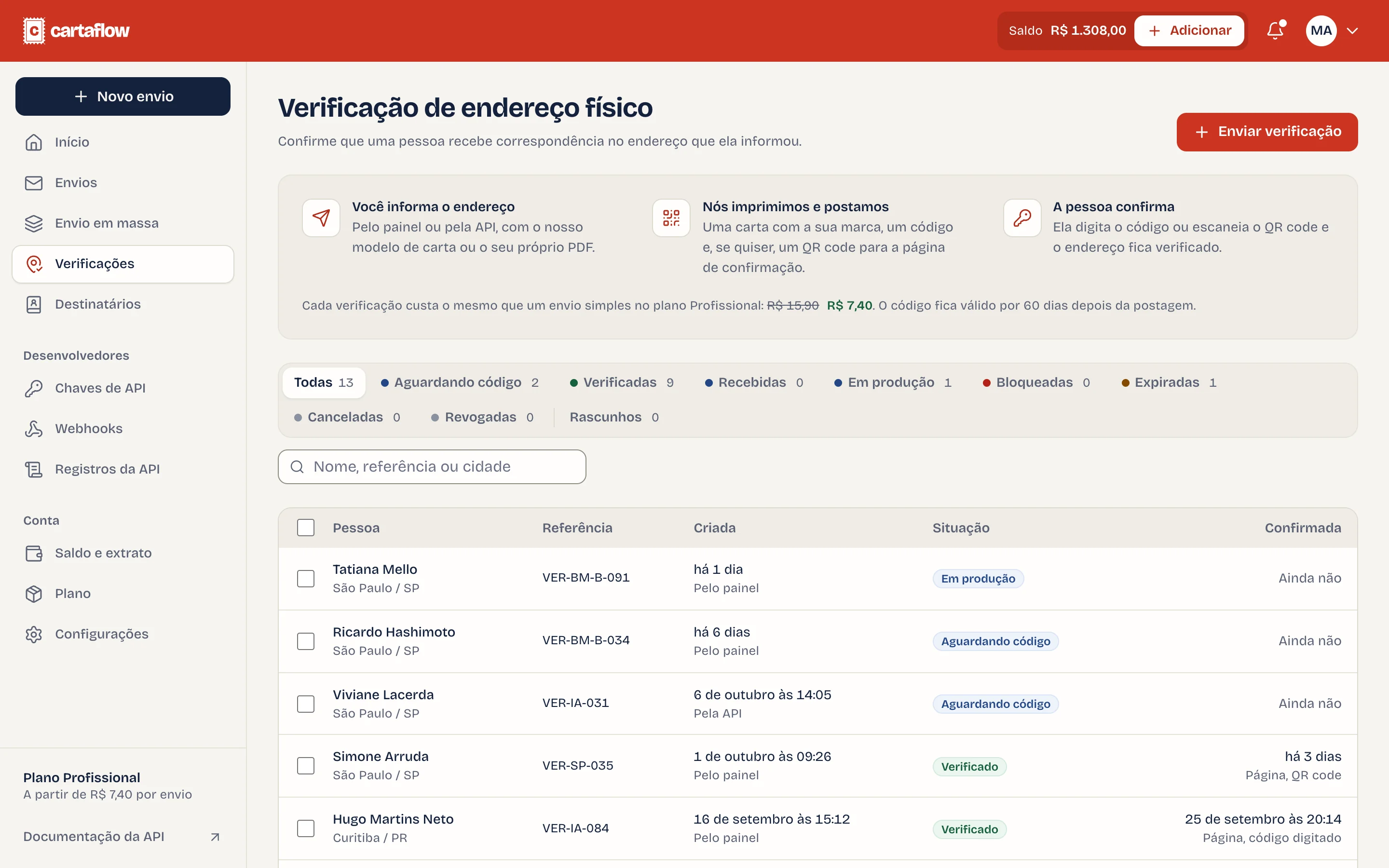
The QR code and the printed link open a page with your logo and name, hosted by CartaFlow, with no CartaFlow branding. From the QR code the code is already filled in, so the person taps the confirm button once; from the printed link they type it. The result appears in your dashboard and the API.
The page can show your website, email, phone and privacy policy link, which you set in the dashboard. Try the demo with the code 482 917.
Create the verification with the address and your reference. The API never returns the code, which only travels inside the mailing. When the person types it in your app, your system sends it to the check endpoint.
curl https://api.cartaflow.com.br/v1/verifications \
  -H "Authorization: Bearer $CARTAFLOW_API_KEY" \
  -H "Content-Type: application/json" \
  -d '{
    "reference": "user_1842",
    "to": {
      "name": "Destinatário Exemplo",
      "address_line1": "Rua Exemplo, 128",
      "address_line2": "Ap. 52",
      "district": "Centro",
      "city": "São Paulo",
      "state": "SP",
      "cep": "01001-000"
    }
  }'
{
"id": "ver_3Hd9Kp2q",
"object": "verification",
"status": "pending",
"reference": "user_1842",
"created_at": "2026-10-13T14:20:00Z"
}curl https://api.cartaflow.com.br/v1/verifications/ver_3Hd9Kp2q/check \
-H "Authorization: Bearer $CARTAFLOW_API_KEY" \
-H "Content-Type: application/json" \
-d '{ "code": "482917" }'{
"id": "ver_3Hd9Kp2q",
"object": "verification",
"status": "verified",
"verified_at": "2026-10-20T09:12:44Z"
}Illustrative API example, subject to change before launch.
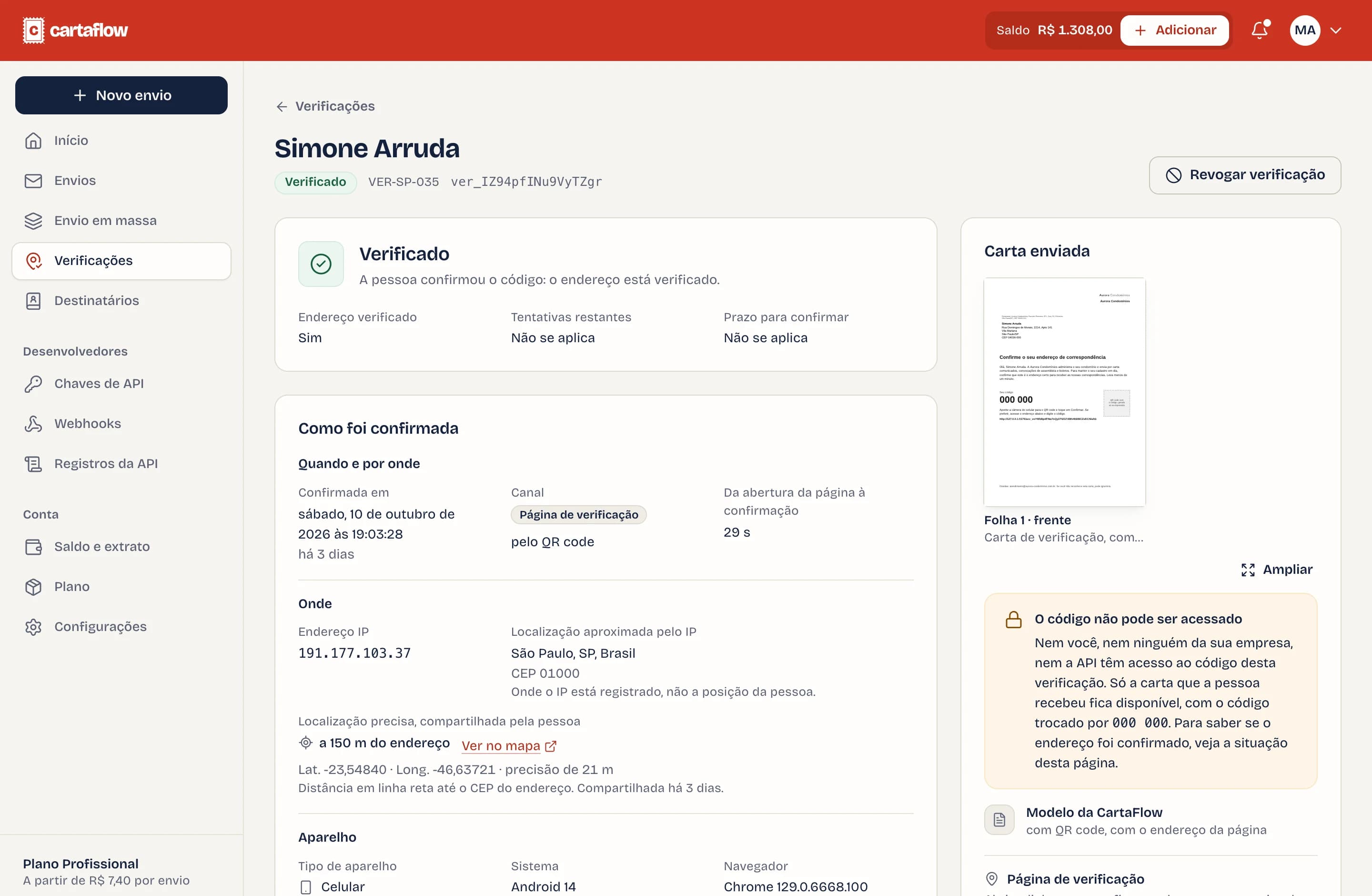
View documentationWhen the person confirms the code on the verification page, CartaFlow records the details of the confirmation. You see them in the dashboard, on each verification, and through the API.
The page tells the person what is recorded and that your business is responsible for the data. The record shows when, from where and on which device the code was entered. It does not prove who entered it.
When the code was confirmed, every attempt, right or wrong, and whether the person scanned the QR code or typed the code.
The IP address and the city, state and country it is registered in. That is where the connection comes from, not the person’s exact position.
Phone, tablet or computer, the operating system and browser with their versions, the language, the time zone and the screen size.
After confirming, the person can share the phone’s location. The dashboard shows how far it is from the mailing address and the point on a map.
Exactly one mailing on your plan. The verification mailing is printed, enveloped and posted like any other.
| Plan | Price per verification |
|---|---|
| Pay as you go | R$15.90 |
| Essential | R$9.90 |
| Professional | R$7.40 |
| Scale | R$5.90 |

That someone at that address received the mailing and entered the code. It does not prove who the person is or who owns the property; combine it with your identity checks.
No. The mailing carries your logo and your name. CartaFlow prints and posts it on your behalf.
A verification page with your logo and name, hosted by CartaFlow, with no CartaFlow branding. The code is already filled in and the person taps the confirm button once. Opening the page confirms nothing by itself. If you verify through the API, the person can type the code in your own app instead.
No. Scanning the QR code with a phone camera opens the verification page with the code filled in. The person can also type the code on the page or in your app.
The date and time, the IP address, the approximate location of that IP (city, state and country), the device, operating system and browser, and whether the person scanned the QR code or typed the code. If the person chooses to share the phone’s location, the distance to the address is recorded too. Wrong attempts are recorded the same way. You see all of it in the dashboard and through the API.
No. The precise location is optional and only asked for after the right code. The browser asks for permission, and the confirmation counts the same if the person says no.
The verification stays as waiting for code in the dashboard and the API. An address is only marked as verified after the right code is entered.
Portuguese, because the recipient lives in Brazil.
Each verification costs the same as one simple mailing on your plan, because the verification mailing is printed, enveloped and posted like any other.
New accounts get R$50 in credit, enough for 3 simple letters.